
Chapter 12: Component 9 - Training and support for users of the AAC-Inclusion toolkit
Chapter 12: Component 9 - Training and support for users of the AAC-Inclusion toolkit
Section outline
-
Chapter 12: Component 9 - Training and support for users of the AAC-Inclusion toolkit
12.1. Introduction: Training to ensure impact
The quality of an educational tool is not only based on its design, but also on the ability of users to use it effectively.
The needs analysis carried out as part of the AAC-Inclusion project highlighted a key finding:
● Teachers and parents not only lack tools, but also support to use them
Thus, training and support are an essential lever for:
● Ensure correct use of tools
● Strengthen user skills
● Guarantee the sustainability of the project
12.2. Objectives of the training
The training offered as part of the AAC-Inclusion toolkit has several complementary objectives.
Understanding AAC
● Fundamental principles
● Objectives
● How it works
Know how to use the tools
● Visual Cards
● Communication boards
● Digital tools
Develop practical skills
● Implementation in real-world situations
● Adaptation to needs
Foster collaboration
● School-Family Communication
● Sharing practices
The training is aimed at several profiles.
Teachers
● teachers in ordinary settings
● special education teachers
Parents
● Home support
● Daily support
Professionals
● Educators
● Speech therapists
● accompanying persons
The training is structured around several modules.
Module 1: Introduction to AAC
● Definition
● Challenges
● Public
Module 2: Visual Aids
● Use of Cards
● Organization
● Examples
Module 3: Communication Boards
● Creation
● Use
● progression
Module 4: Implementation
● Step-by-step guides
● Scenarios
Module 5: Digital tools
● applications
● Integration
Module 6: Monitoring and Evaluation
● Indicators
● Tools
Module 7 : Collaboration
● Strategies
● Tools
Face-to-face training
● Practical workshops
● Demonstrations
● Exchanges
Online training
● modules e-learning
● Videos
● Digital resources
Hybrid training
● combination of the two
Particularly suitable for Erasmus+ projects
Training is based on an active approach.
Learning by doing
● Tool Handling
● simulations
Case Studies
● Real situations
● Analysis
Exchanges between participants
● Sharing of experiences
● co-construction
Feedback
● Regular returns
● Adjustments
Teaching materials
● Presentations
● Guides
● Practical information sheets
AAC Materials
● Visual Cards
● Tables
Digital resources
● Platforms
● applications
References
The pictograms from ARASAAC are a central resource in the training.
Initial training must be supplemented by continuous support.
Post-training follow-up
● Exchanges
● Tips
Community of Practice
● Sharing between users
● Pooling
Support technique
● Usage assistance
● Problem solving
12.9. Example of a training path
Step 1: Awareness
● Introduction to AAC
Step 2: Hands-on training
● Using the tools
Step 3: Implementation
● Field Application
Step 4: Follow-up
● Adjustment
Step 5: Consolidation
● MORE INFO
✔ Involvement of participants
✔ Regular practice
✔ Institutional support
✔ Collaboration
12.11. Common Mistakes to Avoid
Too theoretical training
Impact M
Lack of follow-up
Abandon of practices
Lack of adaptation
Efficiency
One-time training
Insufficient
Effective training allows:
● Better use of tools
● Increased interactions
● Reduced frustrations
● Improved inclusion
Training and coaching is a key pillar of the AAC-Inclusion toolkit.
They guarantee:
● the quality of implementation
● the sustainability of the project
● Impact on the ground
They make it possible to transform a set of tools into a structured and effective educational approach.
The AAC-Inclusion project was designed to meet a concrete and widely shared need: to improve the communication of children with language difficulties, by offering simple, accessible and effective tools.
Through this manual and the associated toolkit, several objectives have been achieved:
● provide a clear understanding of Augmentative and Alternative Communication (AAC)
● Provide practical tools that can be used directly
● Supporting teachers and parents in their implementation
● Fostering an inclusive and collaborative approach
13.2. Contributions of the toolkit
Le toolkit AAC-Inclusion se distingue par :
✔ its simplicity
Tools that are easy to understand and use
✔ Its structure
A clear and progressive organisation
✔ its anchoring in needs
Design based on survey results
✔ its transferability
Resources that can be adapted to different contexts
The implementation of the toolkit makes it possible to:
● Improved communication
● Reduced frustration
● improved communication
● better educational and social inclusion
The success of the scheme is based on:
● Teacher involvement
● Parent Engagement
● The collaboration between the two
The AAC-Inclusion Toolkit provides a basis that can be:
● enriched
● adapted
● Expanded
The use of standardised resources such as those of ARASAAC also opens up prospects for international harmonisation.
Augmentative and Alternative Communication is not just a set of tools:
● It is an inclusive, child-centred approach aimed at giving them a voice.
● The AAC-Inclusion toolkit is fully in line with this ambition.
Appendix 1: AAC Visual Cards (Core Pack)
Needs
● EAT
● DRINK
● TOILET
● SLEEP
● HELP
● AGAIN
Actions
● PLAY
● STOP
● COMING SOON
● LEAVE
● WAIT
● WATCH
Emotions
● CONTENT
● SAD
● ANGER
● FEAR
● CALM
● TIRED
Recommended Use:
● Print
● Laminate
● Organize by categories
Appendix 2: Visual Map Template
Structure standard

EAT
I want to eatRecommendations
● use consistent pictograms (ARASAAC)
● Write in capital letters
● Add a simple sentence
Pictograms from ARASAAC (https://arasaac.org) — Creative Commons License (CC BY-NC-SA).
Appendix 3: Communication Table (Beginner)
I WANT
I FEEL
I DO
EAT
CONTENT
PLAY
DRINK
SAD
STOP
Use:
● Offering choices
● Encouraging pointing
Appendix 4: Communication Table (Intermediate)
I WANT
I FEEL
I DO
EAT
CONTENT
PLAY
DRINK
SAD
STOP
HELP
ANGER
WAIT
Appendix 5: Progress Tracking Matrix
Date
Situation
Communication
Autonomy
Observation
To use:
● daily
● in the classroom and at home
Appendix 6: Example of a visual sequence
Hand washing
Step
Pictogram
Text
1

Turn on the tap
2
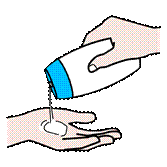
Apply soap
3

Rub hands
4
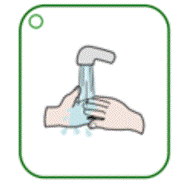
Rinse
5

Dry hands
Pictograms from ARASAAC (https://arasaac.org) — Creative Commons License (CC BY-NC-SA).
Appendix 7: List of Recommended Pictograms (ARASAAC)
Pictogram
Word (ARASAAC)
Usage

Eat
Express the need to eat

Drink
Expressing the need to drink

Toilets
Request the toilet

Play
Express an activity

Help
Asking for help

Stop
Stop an activity

Happy
Expressing a positive emotion

Sad
Expressing sadness

Angry
Expressing anger

Wait
Learning to be patient
Pictograms from ARASAAC (https://arasaac.org) — Creative Commons License (CC BY-NC-SA).
Appendix 8: Quick Guide (Field Sheet)
Quick Start
- Choose 2 cards
- Model
- Propose a choice
- Wait
- Strengthen
Key rules
● Simplicity
● Repetition
● Consistency
Appendix 9: Presentation of the ARASAAC platform
General presentation
ARASAAC (Aragonese Centre for Augmentative and Alternative Communication) is an international reference platform dedicated to Augmentative and Alternative Communication (AAC).
Its objective is to facilitate communication for people with language difficulties, by providing accessible, free and standardised visual resources.
Resources offered by the platform
The ARASAAC website is a real online toolkit, offering in particular:
● Pictograms
A large database of pictograms (objects, actions, emotions, etc.) that can be used to create easily downloadable visual aids.
● Communication materials
o Communication boards
o Visual agendas
o Ready-to-use media
● Authoring tools
o Generation of custom media
o Creating visual sequences
o Adaptation to specific needs
● Educational Resources
o User Guides
o Activities
o Practical examples
● Training area (Aula Abierta)
o modules de formation
o Tutorials
o Usage Scenarios
Interest in the AAC-Inclusion toolkit
Using ARASAAC resources in this toolkit allows you to:
● Ensure visual consistency
● use internationally recognized pictograms
● Facilitate understanding
● strengthen the transferability of the project
Access to the platform
Official website: https://arasaac.org
Conclusion
ARASAAC is a critical resource for the implementation of the AAC.
Its integration into the AAC-Inclusion toolkit helps to improve the quality, consistency and effectiveness of the materials offer

Funded by the European Union. Views and opinions expressed are however those of the author(s) only and do not necessarily reflect those of the European Union or the National Agency for Community Programs in the Field of Education and Vocational Training (ANPCDEFP). Neither the European Union nor ANPCDEFP can be held responsible for them